We don’t have to tell you that Youtube is a terrific tool for marketing. If you’ve been wondering if the transition to the mobile platform is going to negatively impact the effectiveness of your videos, the answer is no.
Not if you (pardon the pun) play your cards right.
If you haven’t yet heard about cards, get ready, because they’re about to dominate web marketing.
Youtube cards are custom information boxes embedded in the video. When clicked, they can link viewers to a website, other videos, a download page, a funding page — pretty much anything you want.

If it sounds similar to Annotations, it is. With one very major difference: Cards are mobile-friendly.
To understand why this matters (a lot), let’s pluck a few of Youtube’s public statistics:
[show_to accesslevel=’free’]
- Youtube viewers watch 100s of millions of hours every day.
- The average number of Youtube-viewing hours per person increases by 50% every year.
- Half of all Youtube views are on mobile.
- Mobile revenue is steadily increasing.
If you have a Youtube channel, look at the analytics, and you’ll almost definitely see a large percentage of mobile viewers.
Even if you’re the greatest Youtube Annotations marker in the world, you’re only going to reach about 50% of your audience.
Cards, which work on both web and mobile, are as effective. So, to put it simply, the use of Cards is twice as effective as the use of Annotations.
You can still use Annotations, but, truthfully, it’s time to move on to Cards.
How Youtube Cards Work
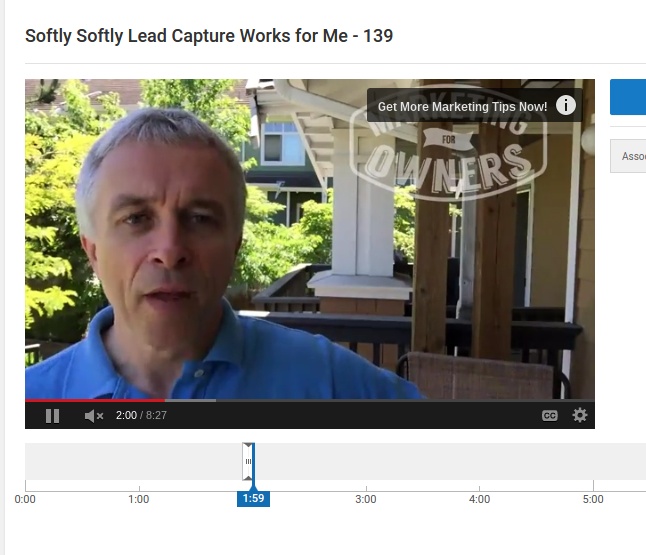
Videos with cards with have a small circle-i logo in the top right of the screen. Periodically, the logo will turn into a Call for Action in a few words. You’ll notice it, but it won’t detract from the video.
If you click on the Call to Action, you’ll see the expanded card on the right side of the screen, as the video continues to play. The card includes a thumbnail, if applicable, the Call to Action, and a link.
Sometimes the link will take you to another site in a new tab (on the web). Sometimes, it will use an integrated app (such as Google One Today) that makes a popup on the page, pausing the video, when you click it.
You can add multiple cards to your videos, and they’ll cause minimal interference for viewers.
With the right Call to Actions, they can have a dramatic impact on your sales and leads.
How to Create Youtube Cards on Your Videos
Creating Youtube Cards is simple.
- Log in to your account and go to your videos.
- Click on the video you want to add cards to.
- Click on the Cards icon (the circle-i) underneath the video.
- In the Creator Space, click on the blue “Add card” button.
- You will have four choices:
- Associated Website
- Fundraising
- Merchandise
- Video or Playlist
- For non-video cards, paste the URL into the box. Merchandising and fundraising sites must be approved by Youtube.

- For Associate Website cards, add a Call to Action and teaser text. (More on these below)

- For video cards, you can either select one of your own videos or add a video URL manually.
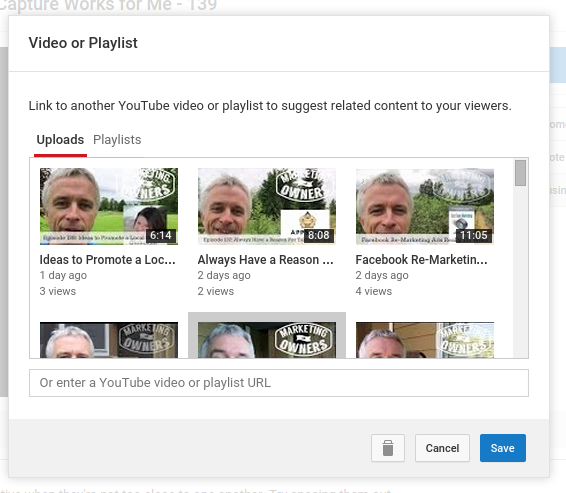
- Click “Create card” to create your card.
- You can move the teaser by clicking and dragging it to anywhere on the video timeline. The teaser will disappear on its own after a few seconds.
- Add additional Cards, if desired.
- If you want to delete or edit a card, click the Edit icon on the right side of the card in the Creator Space.

All new cards and edits are saved automatically.
Creating Effective Cards
The most effective card type for business owners is Associated Website, because it takes people right to your site.
To get them to your site, you need good teaser text — the text that appears on the screen to entice the viewer to click on the card, and a strong Call to Action — the text on the link itself.
This is a whole topic to itself, but to draw viewers in with a quick phrase, give them a reason to want to click.
Generally, the most attention-grabbing reasons are freebies or deals. A free download or a discount on a first order always work well. If your videos are well-received, simply offering more of the same on your website can be effective.
The teaser text and Call to Action can be the same, but you’re given space to give two different pitches, so you might as well use them.
The difference between the two is subtle, but there is a difference. The teaser invites viewers to do something. For example:
- Download (XYZ) for free now!
- Get more (XYZ) tips now!
- Get 20% Off your first order!
- Take our Assessment now!
- Subscribe for special offers!
- Put your (XYZ) knowledge to the test!
The point is to draw them in. Don’t just say “Check Out Our Website!”
The call to action is more direct:
- Click here for a free download
- Get your discount
- Take the Quiz
If you do informational videos, you can verbally mention your website, and set the teaser text to appear at the same time. This adds a bit of extra interactivity, and ensures that viewers won’t miss it.
Increasing Your Leads
For lead generation, you link should lead to a squeeze page with an opt-in box for an email address. If don’t have a squeeze page, you can learn all about them here.
If you’re giving away a free download, don’t link directly to the download — make sure they subscribe to your site or newsletter before downloading.
For assessments and quizzes, provide results via email.
Now that you’re generating leads on mobile, be mindful of the faster-paced mobile platform. Whatever they’re called on to do via Youtube Cards, it should take only a couple of minutes — or less.
- Coupons should be emailed to be used at their convenience (which may not be right now on mobile).
- Quizzes should be brief and fun; assessments should be simple.
- Consider special web access to free tutorials as an alternative to a downloadable PDF (a format that can be a pain to deal with on mobile).
- Use apps such as Google One Today when possible.
Of course, your website should be mobile-friendly. This isn’t just a good idea when using Youtube Cards, it’s a necessity if you want good Google pagerank.
Most importantly, don’t go overboard. Cards are very effectively if used properly, but as soon as they become an intrusion, they lose effectiveness.
Do you use Youtube Cards to generate leads? How do you think it compares to Annotations? Share your experiences and tips in the comments!
[/show_to]
[hide_from visible_to=’public’]
Sorry, access to this special content
is for ‘Owners’ only
Owners log in
here
Not a member of
the Owners Club yet?
[/hide_from]