If you’re finding it a challenge to get good results on Facebook, you probably need to re-evaluate how you’re using it.
The #1 most important thing is engagement. That can’t be emphasized enough. If you’re not getting the kind of engagement you want on Facebook, consider these ten things:
10 Engaging Things That Get Results on Facebook
#1 Branding
You know you need to be serious about branding — and Facebook is no different. Your page name, cover photo, and profile picture should all reflect your brand.
That doesn’t mean you just use your logo over and over. Good branding (which takes a whole other article to detail) is about conveying a consistent look and tone across all media and platforms.
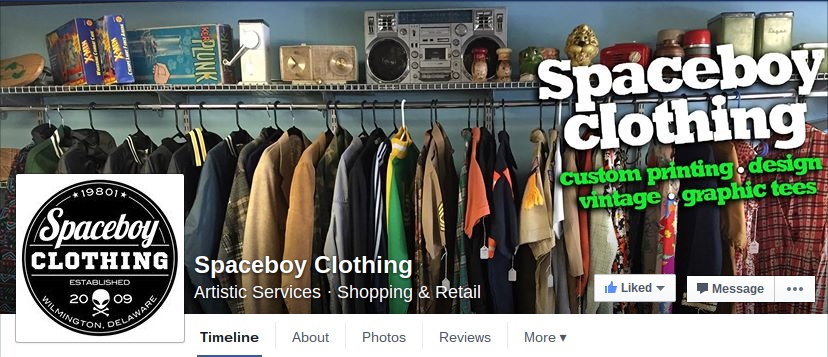
For example, Spaceboy Clothing has a vintage look and tone that they keep consistent in their social media posts and platforms.
In social media, you also have to be mindful of the fact that your post may — and hopefully will! — be shared by your followers and their followers, and on and on.
And sometimes, if people really like your post, they’ll take it for themselves and share it without attribution.
When your content, especially graphic tips and quotes, are well-branded, you can even benefit from unattributed shares.
An easy way to brand your shared graphic content is to upload a branding mark, either your logo or URL (or both) into a graphics tool like Canva. Place the brand on every social media graphic — if it gets lost on the web, people can still find you.
#2 A Good About Section
A good about section is just as important on your Facebook page as it is on your business website.
Your Facebook page about should include a map (unless your business is entirely online and/or you work from home), a short and informative description, and your up-to-date contact information.
Be sure to fill out the Page info as completely as you can, including an Overview, long description, general information, Mission, and any awards your business has won.

Here is a simple and to-the-point About on clothing company LRG’s page. This is really all you need, but no less.
This section is extremely important, because it may the the first exposure many people have to your business. Keep it professional, succinct, and make sure visitors can contact you easily.
#3 Utilize the Call to Action Button
Facebook offers a free Call to Action button for business pages that takes just a few seconds to set up.
Available CTA buttons include a basic “Contact Us” button, a “Call Us” button that dials the number if you’re using a smartphone, “Shop Now,” “Join Now,” “Sign Up,” “Book Now,” Play Game,” and “Watch Video.” The button can also take visitors directly to your app with a click.

Housewares Plus uses the “Contact Us” option above. To set up your CTA, go to your Facebook page and look for the “Create Call to Action” button near the top of the page next to the Like button.
When you click to create, you’ll see a dropdown that allows you to choose your CTA and enter the appropriate information.
You can edit your CTA at any time to align with your marketing campaigns.
#4 Post Often
The less you post on Facebook, the less you exist on Facebook.
Make it your mission to post something several times a day. That should include a couple of original posts as well as shares.

To make it easier, you can use a program like Hootsuite to schedule posts, or simple schedule posts directly on Facebook via the “publish button, as seen above.
#5 Interact Frequently
Facebook is social media, but too often businesses forget the social part because they’re using it as a marketing tool.
The truth is, the “social” aspect of Facebook is just as important on you business page as it is on the personal page you use to keep in touch with friends and family.
Maybe even more important. You can communicate with your friends and family in other ways, but you might never have the chance to make an impression on some of your potential customers without Facebook — because, without Facebook, they wouldn’t have found you.
It’s always a good idea to follow similar businesses, and other like-minded pages (you can’t friend request people as a business page), and to check your page’s feed now and then to like and share posts.
Even more importantly, you need to stay on top of interactions people make with you via your Facebook page, and respond in a quick, friendly manner.

In this example, Wedding Entertainment company Discologic answers a question and follows up on the response. Simple, right? But if you don’t do it, it reflects poorly on your customer service — and good customer service gets results, even on Facebook.
#6 Measure your success
One feature of Facebook Pages that you should never overlook is Insights, Facebook’s built-in analytics tool. It’s free, it’s easy to understand, and it can help you pinpoint what works and what doesn’t.
To access Insights, use Facebook as your business page (do this by selecting it from the dropdown next to the Notifications globe at the top right of the screen.
On your Facebook page, click on “Insights” on the taskbar at the top, between “Notifications” and “Publishing Tools.”
Insights will show you several statistics and graphs, like the one below.

One of the most valuable analytic is Posts, which shows your posts in a list format, comparing the type, reach, and engagement (likes and shares).
You might discover that your photo and video posts get a lot of engagement, but your text posts go virtually unnoticed. In that case, you would work to keep engaging people with photos and videos.
Another nice feature is Pages to Watch on your Overview. Here, you can select up to 10 other pages and compare their stats to yours. It’s a great way to see what works (and what doesn’t) for your competitors as well as yourself.
#7 Be As Visual As Possible
Social media is extremely visual. People move through their Facebook feeds quickly, stopping only when something really catches their eye.
As a business (i.e. promotional) Facebook page, your challenge is greater than friends and family. You really have to give them a reason to look at your posts twice.

So, maybe you’re not National Geographic with an endless supply of amazing photos that relate to your business. You can still offer eye-candy, even if you don’t have beautiful products to sell.
One way is to create cool looking infographics — which you can do for free with Canva. Just drag and drop and add your info.
#8 Share Video
People will stop and watch your videos on Facebook if they offer information they can use, presented in an entertaining manner.
When you plan your social media videos, think short and to the point, use humor if you can, and don’t look at them as commercials. The last thing people want to see on Facebook is a commercial.
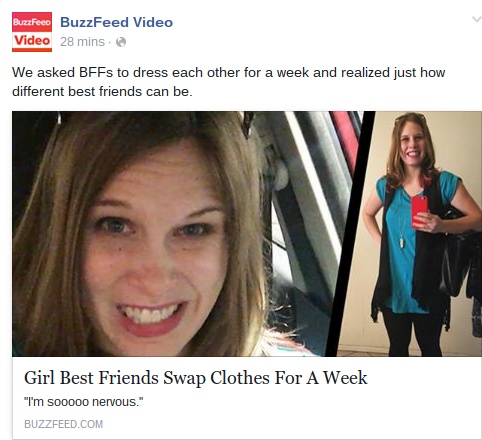
Of course, you don’t have to only share your own videos. Sites like Buzzfeed put out irresistible short videos that are perfect for sharing.
If you share one directly from the website) as opposed to sharing their Facebook post), you can use it to start a conversation, encouraging engagement from your followers.
#9 Make it Fun
Most people use Facebook as a tool for communication with people they know (which probably excludes you), and as a source of recreation and entertainment (which can include you).

Boom Social with Kim Garst has fun with her followers by throwing funny Facebook contests that encourage interaction, laughter, and community building.
Games and contests are some of the best ways to get your followers to open up and interact — but they’re really only effective if they’re fun. A Tuesday Night Trivia Contest can be a blast, and keep them coming back for more.
Conversely, “Like this post for a chance to win a free Ebook” is probably not going to knock anyone’s socks off unless you’re already very well known.
#10 Advertise Occasionally
We all know that, even with the fun we can have with Facebook, it’s all advertising on some level — something to keep in mind when you feel tempted to skip posting non-promotional content.
Only about one in four of your Facebook posts (including shares) should be outright advertising.

When you do advertise, consider making the most of it by creating a targeted sponsored post campaign like the one above by Madison Reed.
If that’s out of your budget, targeted sidebar ads are also effective, in addition to the occasional promotional post,
As long as you don’t treat Facebook like your own free advertising machine, you really can get great results with Facebook with minimal cost and a limited (but regular) amount of time.
How does Facebook work for your business? Share your experiences in the comments!
[hide_from accesslevel=‘free’]
Are You Ready To Start Doubling Your Business With Half The Effort?
If you have a business, whether it’s established or brand new, wouldn’t it be great to know how to use free and low priced modern marketing methods to boost the number of customers banging on your door and dramatically increase your profits? And with no technical degree, no sales staff and just a few minutes a day.
As a member of The Owners Club, you’ll get free access to the methods I used to bootstrap my company from zero to a million dollars in its first 12 months with no sales staff (it was actually $1,002,000). And the methods I’m using today to keep growing it beyond 97,000 customers with very little effort. Best of all, it’s absolutely free.
Go here to get started
[/hide_from]